Managed WordPress Hosting
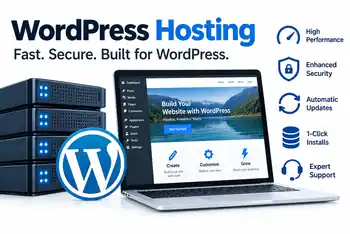
Our WordPress Hosting provides automatic setup, backups and software updates paired with 24/7, award-winning support.
Get started in just a few clicks. With the best hosting for wordpress
WordPress Basic
WordPress Deluxe
WordPress Ultimate
Easy Setup and Migration
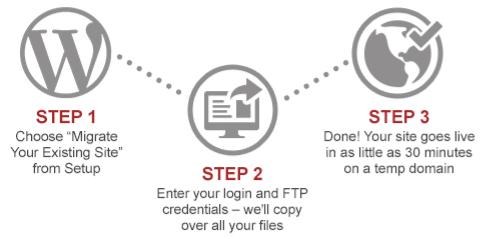
WordPress comes pre-installed, helping you get started with less manual setup. You will be given a temporary web address if you don’t have one already when the data base is automatically setup for you. If you want to migrate an existing WordPress site to bladedomainandhosting Managed WordPress, then you can do this with a one-click migration tool we have.
Speed, scalable & reliable
Our experts have completely build the new Managed WordPress hosting, tweaking the platform for maximum performance and reliability suited for WordPress. With WordPress distributed across multiple dedicated load-balanced servers using SSD, which have high IO web and database servers. Also we have added multiple caching layers and caching mechanisms, which brings high optimized response times for your end-users tor higher performance. If you are expecting traffic spikes on your website. You wont have to worry. our network is ready to easily absorb those and keeping performance at it’s maximum. We also have the plans automatically backed up (nightly backups with a 30 day retention time and free restores).
Security Priority
Because there is about 75+ Million WordPress sites online. They are a popular target for hackers. So to help with this we have implemented redundant web application firewalls geared to WordPress specific rules help prevent these attackers from attacking your site. The malicious activity is monitored and our security experts will take care of any activity detected. We have measures to reduce effects of DDOS attacks and traffic can be re-route on demand.
Go ahead and get started today
We have you covered with multiple plans to choose from. With all our plans you will be able to upgrade(or downgrade) in case your needs change. So go ahead and start today making things easier with Managed WordPress.
Frequently Asked Questions About WordPress Hosting
What is managed WordPress hosting?
Managed WordPress hosting is designed specifically for WordPress websites. WordPress comes pre-installed, and the hosting plans include features such as SSL certificates, backups, malware scanning, and a web application firewall. The included features vary by plan, so review each plan’s details before choosing.
Is WordPress installed when I purchase a hosting plan?
Yes. WordPress is pre-installed with our managed WordPress hosting plans, helping you get started without having to install the software manually. You can then select a theme, configure your website, and add the plugins and content you need.
Do WordPress hosting plans include SSL certificates and website security?
Yes. All three plans list an SSL certificate, a web application firewall, and daily malware scanning. These features help protect website connections and identify potential security issues. Additional features, including malware removal and DDoS protection, depend on the plan you choose.
Are backups included with WordPress hosting?
Yes. Backup features are included, but the schedule and available options depend on your plan. Basic lists weekly backups, Deluxe lists daily backups, and Ultimate lists daily and on-demand backups. Check the current plan details for backup retention, restoration options, and any applicable conditions.
Can I move my existing WordPress website to Blade Domain & Hosting?
The hosting page lists a one-click migration tool for existing WordPress websites. Before migrating, make sure you have access to your existing website and domain settings, and keep a current backup. Review the migration instructions to understand what is included and whether any manual steps are required.
Can I upgrade my WordPress hosting plan later?
Yes. You can choose a plan based on your current needs and upgrade if your website requires more storage or additional features. Compare the plans before upgrading, especially if you need features such as staging, enhanced malware removal, on-demand backups, or WooCommerce support.

